/o/commerce-media/accounts/-1/images/123516512?download=true
WebContent To PDF convertor
説明
Hello Developers,
This utility allow user to convert web content/Journal Article to PDF.
This hook leverage the power of Liferay open office service.No need to use any third party jars to achieve pdf conversation.
Configuration:
Which can be enabled from Liferay Control Panel > Server Administration > External Services > Enabling OpenOffice integration provides document conversion functionality.
Check the box and save it.
Before that you have to follow below steps to start this service
1. Install OpenOffice.org v2.0.3 or higher (has been tested on many versions, include 3.2).
2. Go to the folder where it was installed (for example, C:\Program Files\OpenOffice.org\program) and start OpenOffice service with the following command:
soffice -headless -accept="socket,host=127.0.0.1,port=8100;urp;" -nofirststartwizard
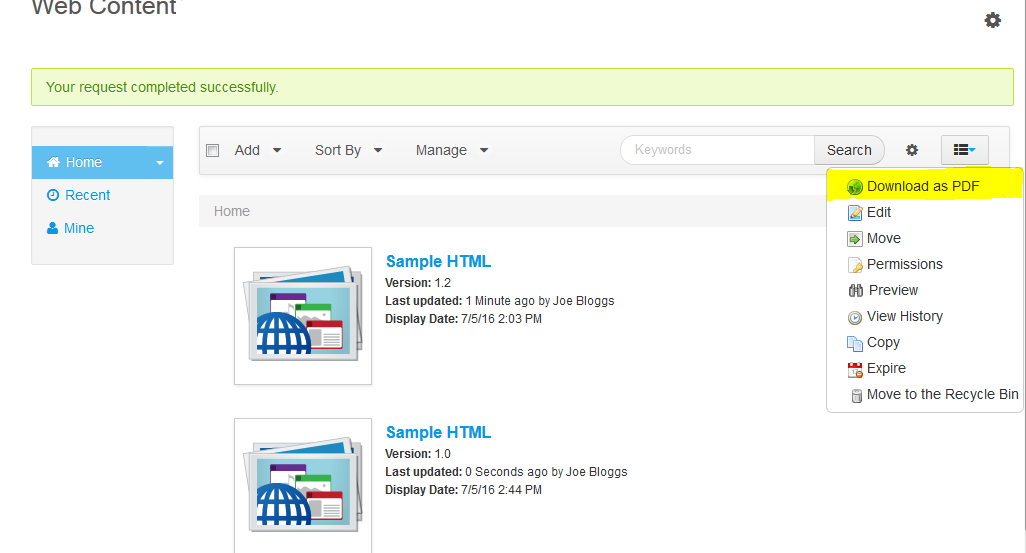
Now enable the service from control panel and deploy the hook.You will be able to see the option as mentioned in screenshot 'Download as PDF' in option menu.
This utility allow user to convert web content/Journal Article to PDF.
This hook leverage the power of Liferay open office service.No need to use any third party jars to achieve pdf conversation.
Configuration:
Which can be enabled from Liferay Control Panel > Server Administration > External Services > Enabling OpenOffice integration provides document conversion functionality.
Check the box and save it.
Before that you have to follow below steps to start this service
1. Install OpenOffice.org v2.0.3 or higher (has been tested on many versions, include 3.2).
2. Go to the folder where it was installed (for example, C:\Program Files\OpenOffice.org\program) and start OpenOffice service with the following command:
soffice -headless -accept="socket,host=127.0.0.1,port=8100;urp;" -nofirststartwizard
Now enable the service from control panel and deploy the hook.You will be able to see the option as mentioned in screenshot 'Download as PDF' in option menu.
開発者
Publisher Date
November 6, 2026
Deployment Method
Liferay PaaS
Liferay Self-Hosted
App Type
DXP
バージョン
1.0
サポート対象のバージョン
6.2
Standard Price
Free
Help and Support
リンクを共有