/o/commerce-media/accounts/-1/images/123544972?download=true
Manage multiple assets centrally (for different sites)
Description
Managing assets by going over different sites and asset specific page
(Web content, Blog, Wiki and Document & Media) in Control Panel is
tedious sometime.
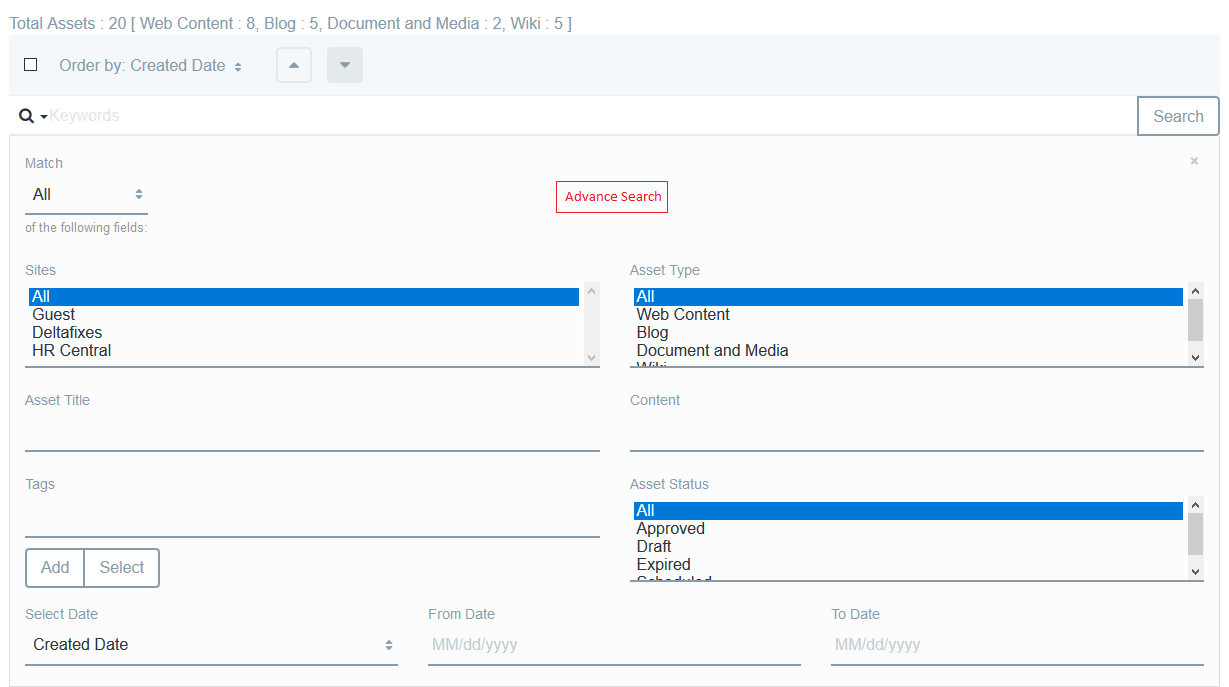
With the help of this plugin, user can manage all the assets centrally (for multiple sites - user having access to, except Global site). User can perform search (powered by ElasticSearch) by using different search criteria like title, content, full text, asset type, status, tags, site name, created date and modified date. User can perform below operations on different assets.
1. Assign tags to multiple different assets
2. Perform download of multiple document and media files
3. Change status (Approve, Draft and Expire) for multiple different assets
4. Deleting multiple different assets
5. Upon clicking on any asset, it will open asset in edit mode in Control Panel (if user has access to it)
Please refer documentation for more detail.
With the help of this plugin, user can manage all the assets centrally (for multiple sites - user having access to, except Global site). User can perform search (powered by ElasticSearch) by using different search criteria like title, content, full text, asset type, status, tags, site name, created date and modified date. User can perform below operations on different assets.
1. Assign tags to multiple different assets
2. Perform download of multiple document and media files
3. Change status (Approve, Draft and Expire) for multiple different assets
4. Deleting multiple different assets
5. Upon clicking on any asset, it will open asset in edit mode in Control Panel (if user has access to it)
Please refer documentation for more detail.
Developer
Publisher Date
November 6, 2026
Deployment Method
Liferay PaaS
Liferay Self-Hosted
App Type
DXP
Version
1.0
Supported Versions
7.0,
7.1
Standard Price
Free
Help and Support
Share Link