/o/commerce-media/accounts/-1/images/123492662?download=true
Google Drive with Liferay repository
Description
Extending Liferay document& media to support Google Drive as repository.
Steps for integration :
1) Generate Client Id and secret code from https://console.developers.google.com/project
and redirect URL must be preceding by /c/document_library/google_api_access?cmd=token
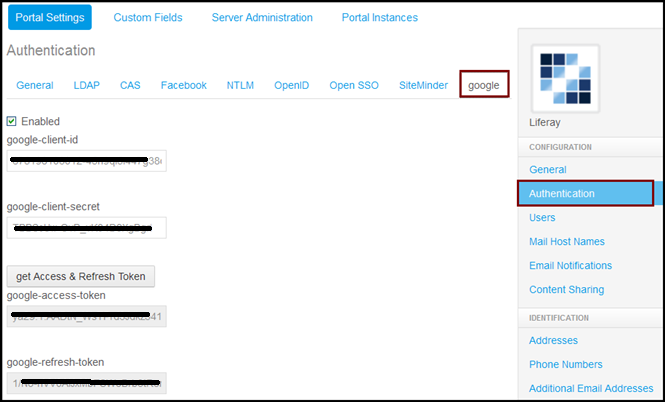
2) Use this authentication credential in Control Panel ->Portal Setting --> Authentication --> google
3) Go to Cignex-Datamatics (organization) --> Control Panel → Content → Document and Media -->Add Repository.
* Create a repository named "mydrive"
* Select Repository Type as "Google Repository"
** Inside Google-Drive, it will create a mydrive folder under "Cignex-Datamatics", name of the organization.
Steps for integration :
1) Generate Client Id and secret code from https://console.developers.google.com/project
and redirect URL must be preceding by /c/document_library/google_api_access?cmd=token
2) Use this authentication credential in Control Panel ->Portal Setting --> Authentication --> google
3) Go to Cignex-Datamatics (organization) --> Control Panel → Content → Document and Media -->Add Repository.
* Create a repository named "mydrive"
* Select Repository Type as "Google Repository"
** Inside Google-Drive, it will create a mydrive folder under "Cignex-Datamatics", name of the organization.
Developer
Publisher Date
November 6, 2026
Deployment Method
Liferay PaaS
Liferay Self-Hosted
App Type
DXP
Version
1.0
Supported Versions
6.2
Standard Price
Free
Help and Support
Share Link