/o/commerce-media/accounts/-1/images/123503691?download=true
Site Feedback Portlet
説明
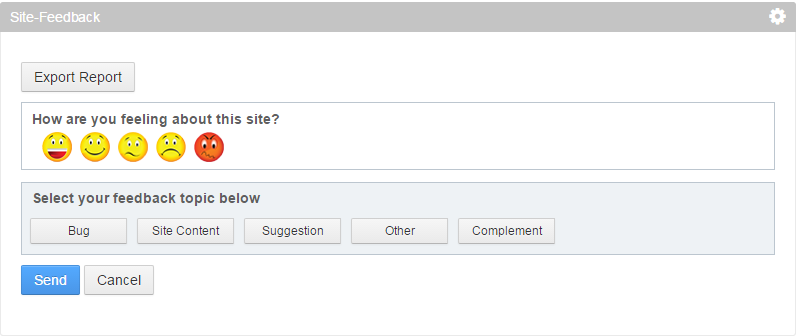
Feedback portlet will be used for collecting the feedback from visitors
of the site.
This feature may be used to collect feedback site wise in the portal.
Feedback is very necessary for any of the site or project. It gives the users to provide their suggestion to improve the site in better way.
Features:
• Rating by end user
• There are currently 5 categories ("Bug", "Site content", "Suggestion", "Complement" and "Other") based on these categories some sub-categories is there.
By clicking on those sub-categories user can provide feedback(text).
• Admin can add more categories or subcategories or may be change existing one as per requirement.
• Email Notification:
After feedback submission, an email will be triggered to the email id which is entered by user and admin email id.
• Report Generation:
For Admin there is export feature to get feedback data in excel form.
Admin can export the data of all sites or current one based on selected date range.
Configuration:
There is some configuration in feedback portlet configuration.
• Admin can specify the fields for submitting the feedback form by user: "Name", "Email (by default) ", "Mobile Phone" and "Comment".
• Admin can also configure the email details as admin email id, subject for admin email and user email.
This feature may be used to collect feedback site wise in the portal.
Feedback is very necessary for any of the site or project. It gives the users to provide their suggestion to improve the site in better way.
Features:
• Rating by end user
• There are currently 5 categories ("Bug", "Site content", "Suggestion", "Complement" and "Other") based on these categories some sub-categories is there.
By clicking on those sub-categories user can provide feedback(text).
• Admin can add more categories or subcategories or may be change existing one as per requirement.
• Email Notification:
After feedback submission, an email will be triggered to the email id which is entered by user and admin email id.
• Report Generation:
For Admin there is export feature to get feedback data in excel form.
Admin can export the data of all sites or current one based on selected date range.
Configuration:
There is some configuration in feedback portlet configuration.
• Admin can specify the fields for submitting the feedback form by user: "Name", "Email (by default) ", "Mobile Phone" and "Comment".
• Admin can also configure the email details as admin email id, subject for admin email and user email.
開発者
InfoAxon Technologies India Pvt. Ltd.
Publisher Date
November 6, 2026
Deployment Method
Liferay PaaS
Liferay Self-Hosted
App Type
DXP
バージョン
1.0
サポート対象のバージョン
6.2
Standard Price
Free
Help and Support
リンクを共有